Exploratory Data Analysis & Statistical Visualization
Look before you model: loss distributions, risk curves, and charts that make a point in a boardroom.
Lesson 5 · OverviewBy the end of this lesson you can…
- Build plots with matplotlib’s figure/axes model and seaborn’s data-aware functions
- Choose the right chart for discrete counts vs. continuous losses
- Use log scales to see skewed, long-tailed data
- Compare risk classes with boxplots, and spot relationships a correlation misses
- Format charts for executives: labels, palettes, currency axes, a headline
- Assemble a diagnostic deck on non-linear trends and adverse selection
Companion notebook: lesson-05-eda-visualization.ipynb — worked examples and self-checking exercises.
Plotting Mechanics
Figures, axes, and where seaborn fits in.
matplotlibFigures and axes
import matplotlib.pyplot as plt
import matplotlib.ticker as mtick
import seaborn as sns

sns.set_theme(style="whitegrid")

fig, axes = plt.subplots(1, 2, figsize=(11, 4))   # 1 row, 2 panels

axes[0].hist(claims["incurred"], bins=60, color="#0e6b6b")
axes[0].set(title="Linear scale", xlabel="Incurred per claim")

axes[1].hist(claims["incurred"], bins=np.logspace(0, 5.1, 60))
axes[1].set_xscale("log")
axes[1].set(title="Log scale")

fig.savefig("output/severity.png", dpi=150, bbox_inches="tight")sns.boxplot(…, ax=ax)Always use the explicit fig, ax = plt.subplots() style, and pass ax= to seaborn. You control exactly which panel each plot lands on.
Loss Distributions
Discrete counts, continuous amounts, and the log scale.
ContinuousClaim sizes: why the log scale
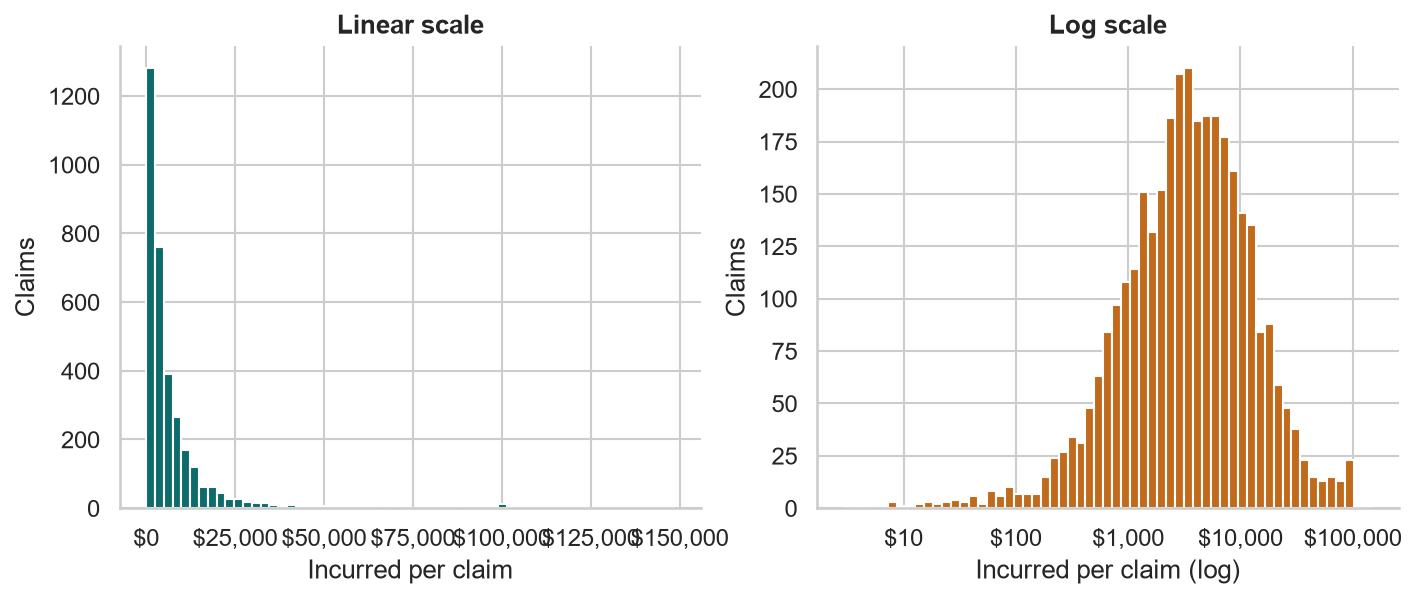
On a linear axis, a handful of 100,000 claims squash everything else into one bar. On a log axis, the shape appears: a roughly bell-shaped hump — the signature of a lognormal-like severity (Course 1, Lesson 7).
For histograms, space the bins evenly in log terms with np.logspace; for seaborn, log_scale=True does it for you.
ContinuousComparing distributions with KDEs
fig, ax = plt.subplots(figsize=(9, 4))
sns.kdeplot(data=claims, x="incurred",
            hue="coverage", log_scale=True,
            common_norm=False, fill=True,
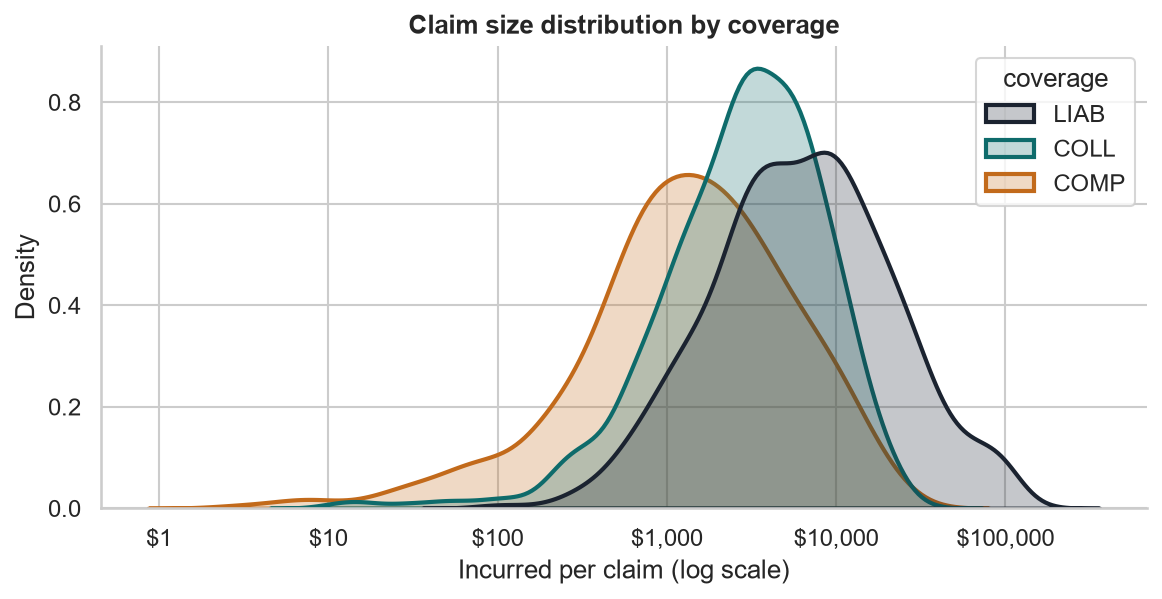
alpha=0.25, ax=ax)- A kernel density estimate is a smoothed histogram — easier to overlay than bars
common_norm=False: each curve integrates to 1, so shapes compare fairly despite different claim counts- Liability sits right of the others, with a long upper tail
DiscreteClaim counts are not continuous
counts = (abt["n_claims"].astype(int)
          .clip(upper=3).value_counts().sort_index())
bars = ax.bar(["0", "1", "2", "3+"], counts.values)
ax.bar_label(bars, labels=[f"{v:,}" for v in counts.values])
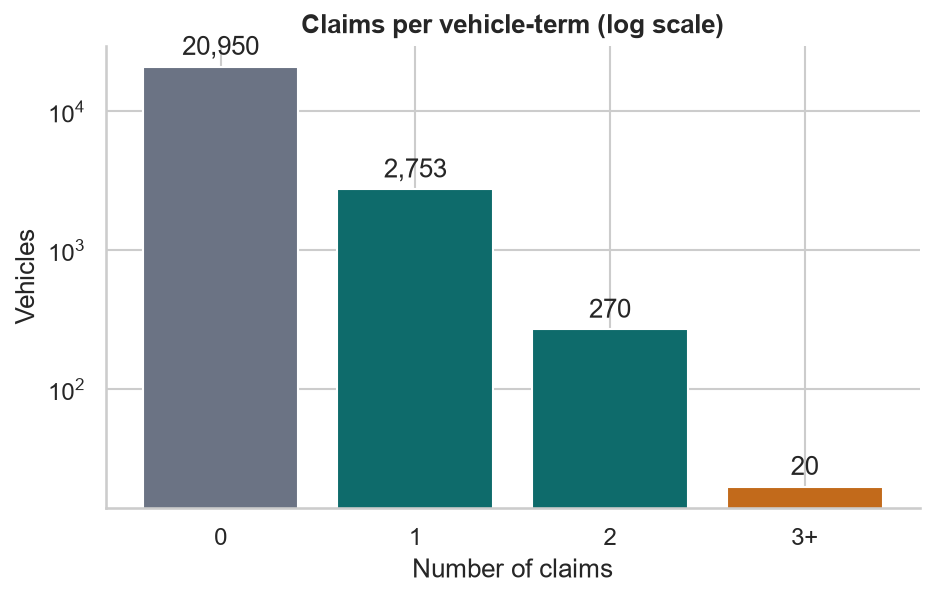
ax.set_yscale("log")- Counts take whole values: use bars, not a histogram or a density
- Most vehicles have zero claims — the log axis keeps the rare 2s and 3s visible
bar_labelputs exact values on the chart
Relationships & Risk Classes
Boxplots, trend curves, and the limits of correlation.
Risk classesBoxplots across vehicle styles
order = (claims.groupby("vehicle_style")["incurred"]
         .median().sort_values().index)
sns.boxplot(data=claims, x="vehicle_style", y="incurred",
            order=order, ax=ax)
ax.set_yscale("log")
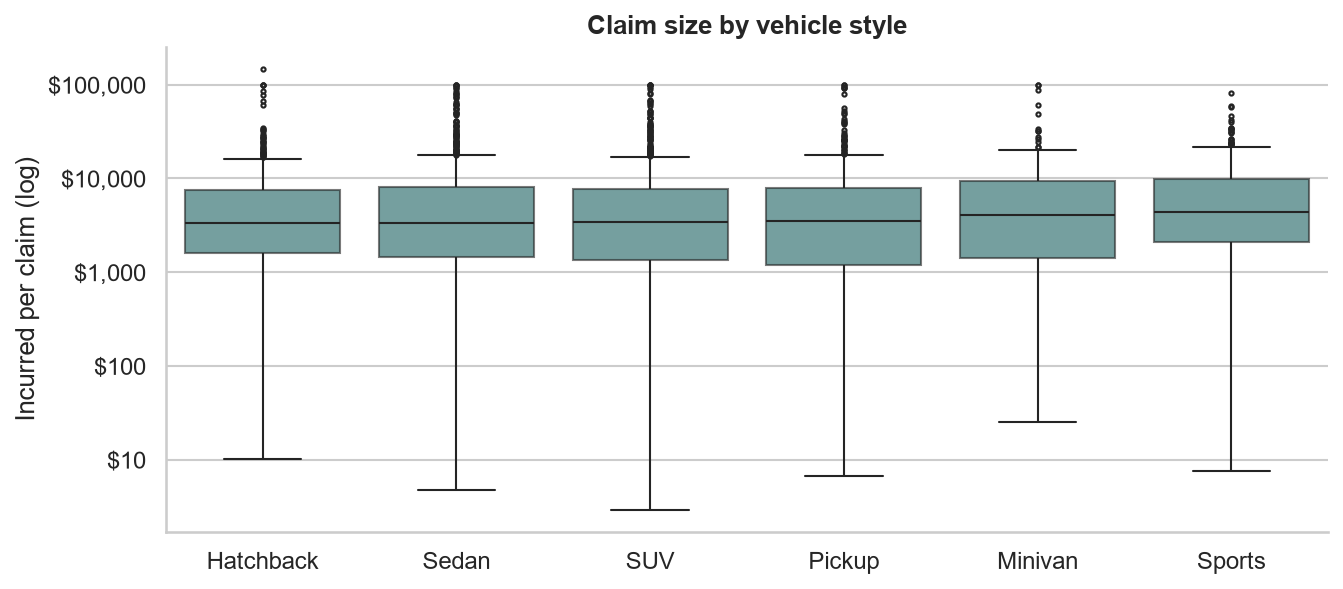
A box shows the median and middle 50%; whiskers and dots show the spread and outliers. Sort categories by the statistic you’re comparing — alphabetical order hides the pattern.
Non-linear trendsFrequency by driver age
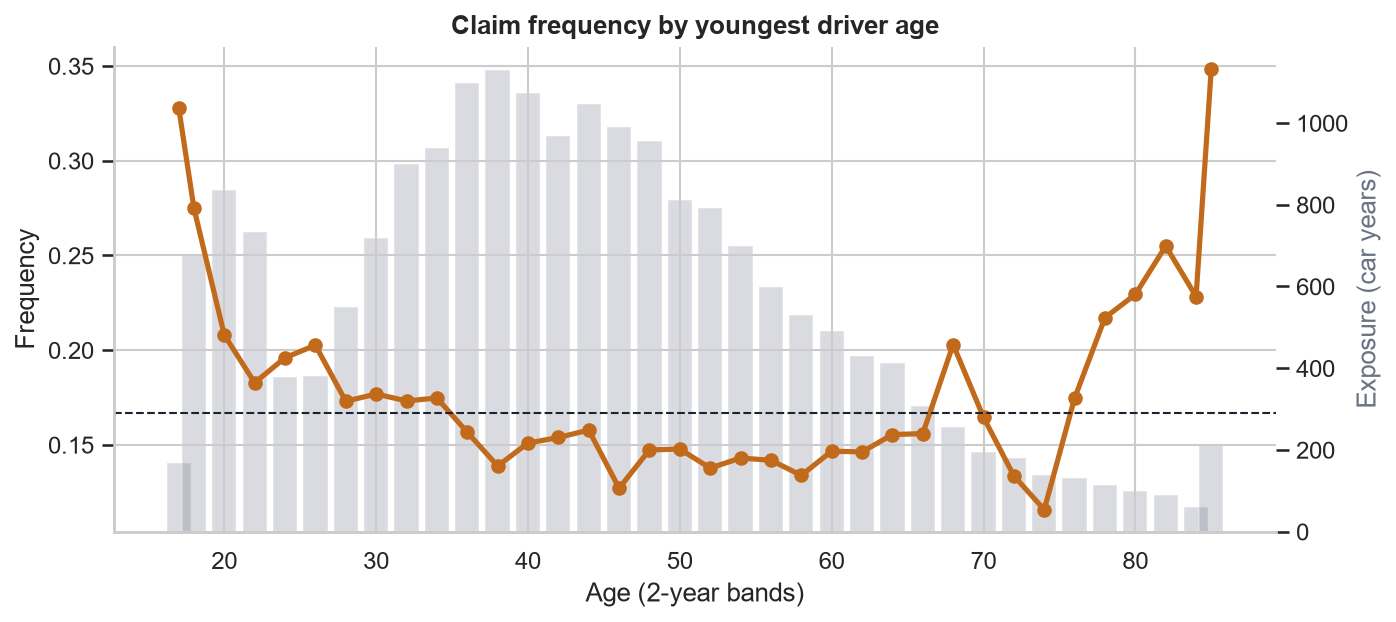
A U-shape: young drivers are inexperienced, the oldest drivers’ risk rises again. The gray bars (exposure) show why the ends zig-zag — there is far less data there. Always show the exposure behind a rate.
CorrelationWhat a correlation matrix can’t see
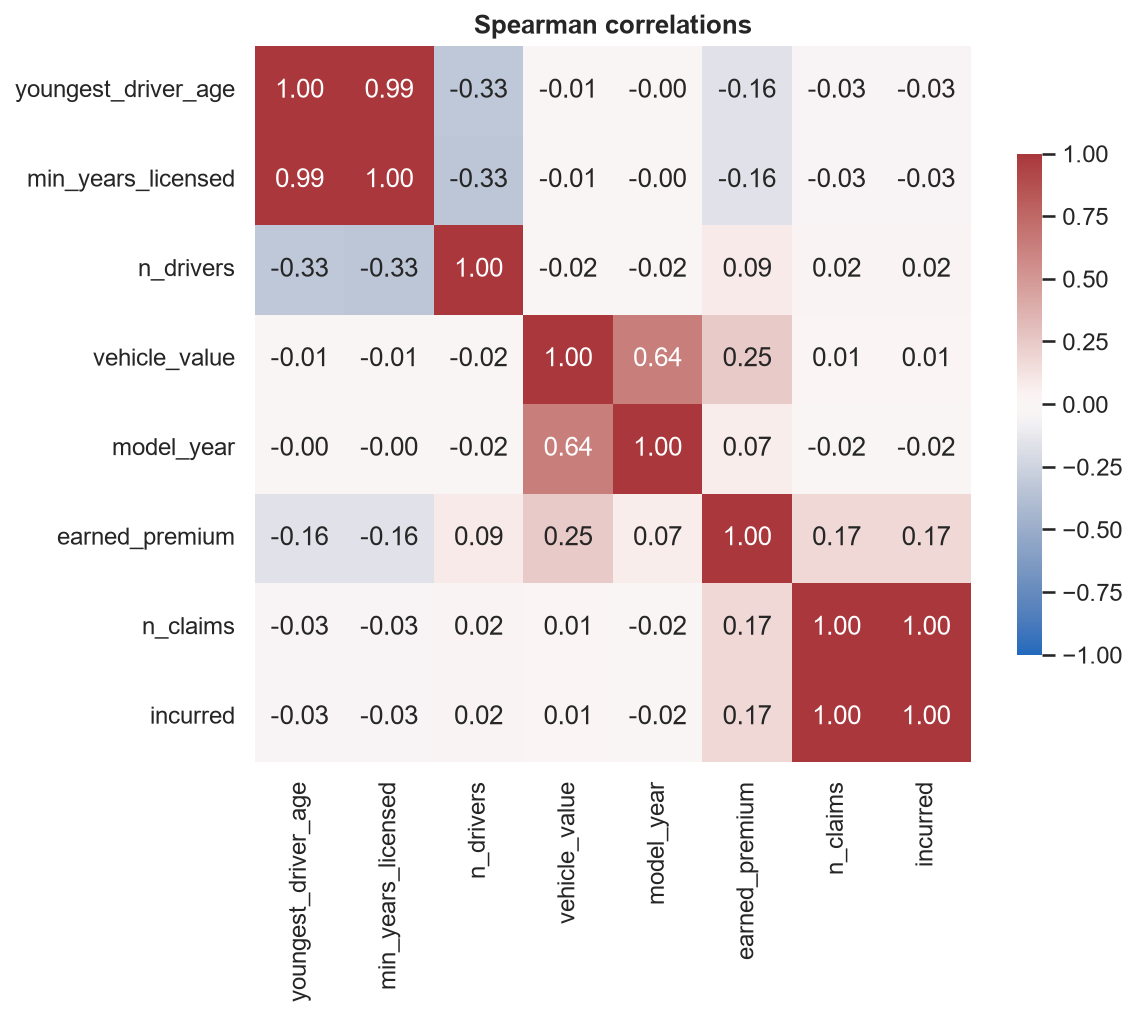
corr = num_cols.corr(method="spearman")
sns.heatmap(corr, annot=True, fmt=".2f",
cmap="vlag", center=0, vmin=-1, vmax=1)- 0.99 age vs. years licensed: near-duplicates. Keep one, or a model can’t separate them
- −0.03 age vs. claims — yet the previous slide shows a strong effect
Correlation measures linear (or monotone) association. A U-shaped effect has near-zero correlation. Never drop a variable because its correlation is small — plot it.
Charts for Executives
From “a plot” to “a point”.
FormattingSame data, different message
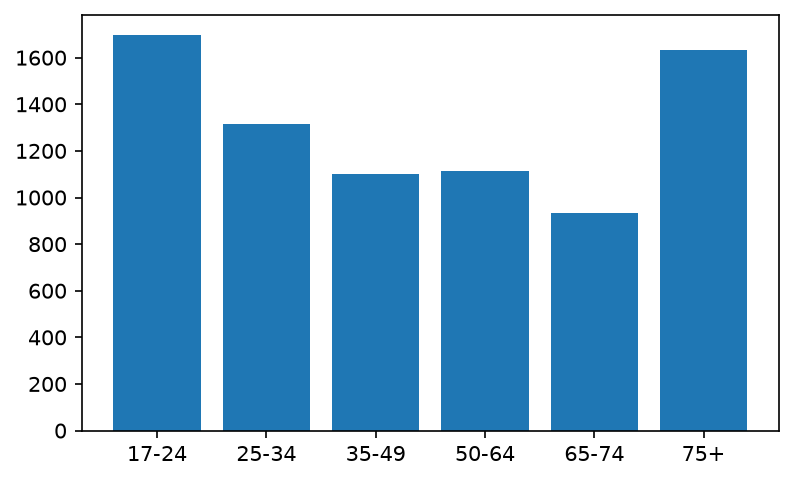
Default: no title, no units, no message.
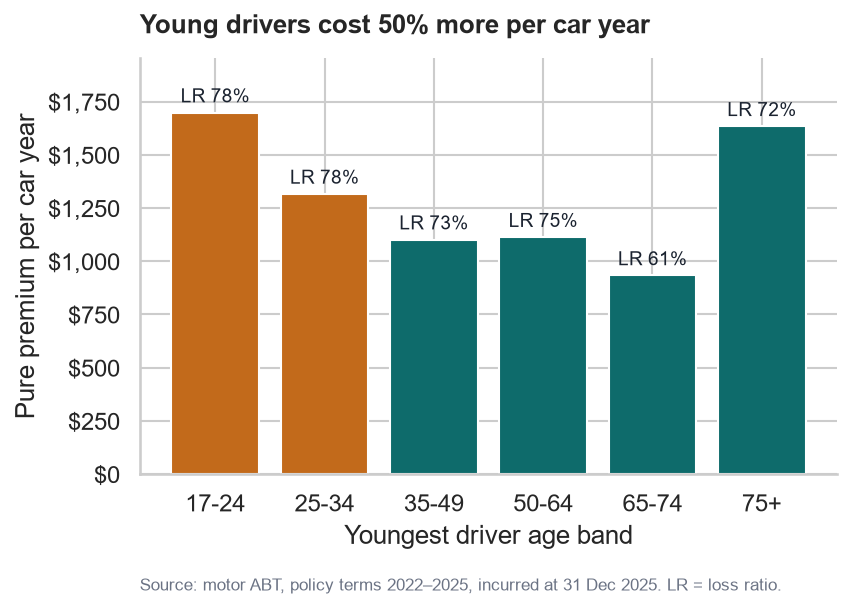
Formatted: the title is the finding.
Headline title
State the conclusion, not the variable namesUnits
StrMethodFormatter("${x:,.0f}"); PercentFormatter(1.0)Color with purpose
Highlight what matters; gray or one hue for the restSource note
Data, period, evaluation date, definitionsFormattingThe code behind the “after” chart
colors = ["#c26a1b" if lr > 0.76 else "#0e6b6b"
          for lr in seg["loss_ratio"]]
fig, ax = plt.subplots(figsize=(6, 3.6))
bars = ax.bar(seg.index.astype(str), seg["pure_premium"],
              color=colors)
ax.bar_label(bars, labels=[f"LR {lr:.0%}"
                           for lr in seg["loss_ratio"]])
ax.yaxis.set_major_formatter(
    mtick.StrMethodFormatter("${x:,.0f}"))
ax.set_ylim(0, seg["pure_premium"].max() * 1.15)
ax.set_title("Young drivers cost 50% more per car year",
             loc="left", pad=12)
ax.set(xlabel="Youngest driver age band",
       ylabel="Pure premium per car year")
ax.text(0, -0.28, "Source: motor ABT, policy terms 2022–2025, "
        "incurred at 31 Dec 2025.", transform=ax.transAxes,
fontsize=8, color="#6b7384")- Define your palette once as constants and reuse it across every chart
set_ylim(… * 1.15)leaves room for bar labels- Left-aligned titles read like a headline
transform=ax.transAxespositions text relative to the axes (0–1), not the data
Check the claim in your title against the numbers: 17–24 pure premium is 1,699 vs. 1,102 for 35–49 — about 54% more. “50% more” is a fair, conservative headline.
DiagnosticsSpotting adverse selection
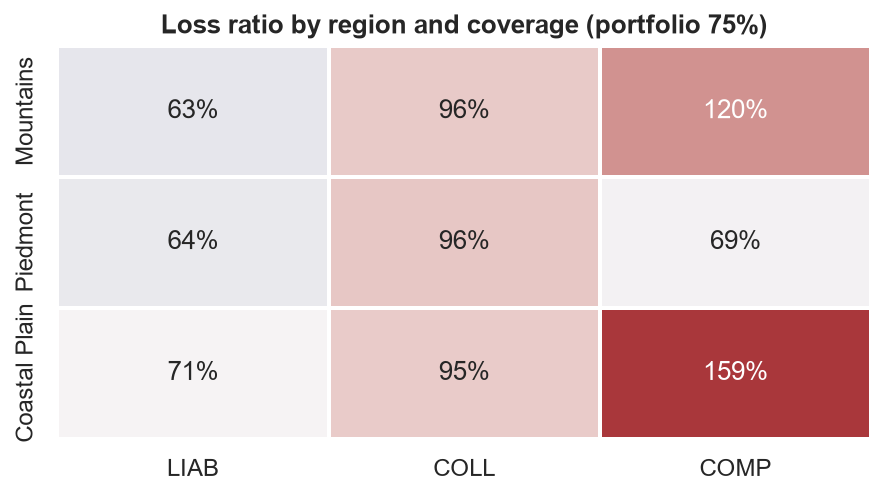
Adverse selection: when price doesn’t follow risk, the risks you under-price stay (or join), and the ones you over-price leave for a competitor. Your book drifts toward the business you lose money on.
The warning sign is a segment whose loss ratio sits well above the portfolio’s — risk rising faster than premium. Center a diverging palette on the portfolio loss ratio so those cells jump out.
Coastal comprehensive at 159% is under-priced by roughly half. Any competitor that rates for coastal exposure will write the low-risk inland customers and leave us the coast.
Actuarial Lab · 75 minA visual diagnostic deck
Build six executive-ready charts in notebooks/lesson05_eda.ipynb, saved to output/figures/:
- Severity by coverage — log-scale KDE
- Claim counts per vehicle — bars
- Frequency by driver age with exposure bars
- Pure premium by vehicle style, sorted
- Loss-ratio heat map: region × coverage
- One chart of your own that shows a non-linear effect
Every chart must have
- A headline title stating the finding
- Formatted axes (currency, percentages, thousands)
- The course palette — defined once, as constants
- A source note with the evaluation date
- Exposure or claim counts shown wherever a rate is
Write a helper — style_axes(ax, title, source) — on chart one. By chart six you’ll be glad.
Lab · DeliverableFrom charts to a story
Finish with a Markdown cell for the head of pricing, five bullets maximum:
- The single biggest pricing gap, with its size
- Where the age curve says the rating plan is too flat
- One segment too thin to conclude anything about yet
- What you’d investigate next — and what data you’d need
Export the notebook to HTML (Course 0) and hide the code with --no-input.
The next lesson’s spatial analysis tests the hypothesis your heat map raises: is the coastal gap really about the coast — or about something else that happens to be in the east?
RecapLesson 5 checklist
- I use
fig, ax = plt.subplots()and passax=to seaborn - I plot counts as bars and amounts as histograms or KDEs
- I reach for a log scale for long-tailed losses
- I sort categories by the statistic I’m comparing
- I show exposure alongside every rate
- I don’t trust a small correlation to rule out an effect
- My chart titles state the finding
- I can explain adverse selection and spot its warning signs
Programmatic Spatial Data Analysis
GeoPackages, coordinate systems, and spatial joins — rating territories without leaving Python.